Dear developer, hello!
BrainFrame is an industry-leading vision inference platform, and the first visual, easy-to-use open platform in the industry to adopt packageable, interconnectable computer vision deep learning algorithm capsules and automatic algorithm fusion technology. It is completely free for developers! Download the platform
1. Who the course is for
• Developers in computer vision / machine learning;
• Technical staff at industry application users / integrators;
• Teachers and students in related research fields at universities;
2. What you will gain
• Understand and master OpenCV algorithm capsule programming (the recommended open-source industry standard);
• Understand and master BrainFrame computer vision deep learning programming;
• Understand and master building applications and new algorithms/VisionCapsules on the BrainFrame vision AI platform;
• Use the BrainFrame vision AI platform to turn requirements and research results into practical industry application solutions;
• Through the course platform and developer community, connect and cooperate with more people in the industry;
• Apply it in many fields such as smart cities, transportation, security, campuses, emergency response and research;
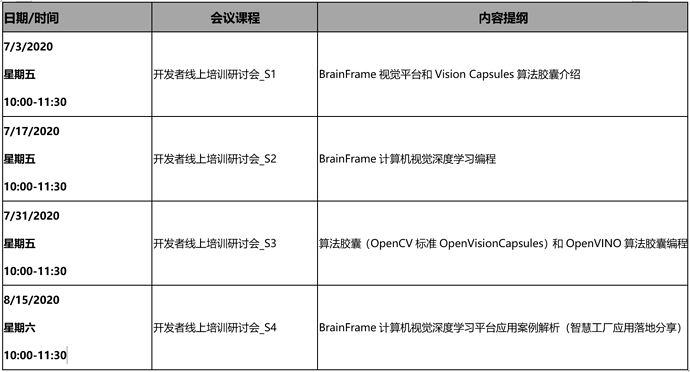
3. Content and schedule of this session (Beijing Time)
The course consists of lectures, online demonstrations, live Q&A and after-class exercises.
4. Format
This training is held online.
(1) Online. We use the “ZOOM meeting” software; please download it in advance. The meeting number is (provided after registration), with no password.
To ensure the quality of the event, please follow the instructions below to complete the registration. After pre-approval, we will email you the meeting number as soon as possible.
Step 1: Scan the QR code
or open the registration link on a PC: http://new.mymova.com/dilililabs/Event202007/SelectTicket
Step 2:
No sign-up needed: choose the course, click “Next” and fill in your information to complete registration. After pre-approval, the registration confirmation and course information will be sent to your email as soon as possible.
Attendees, please scan the QR code to join the developer technical support community and get the latest course information first. Please note “company_name”.
Thank you for your support and understanding!
BrainFrame video analytics product team