Excuse me, do you know how to run the official website Capsule on the client. I downloaded two capsules that I don’t see any class names available in the second drop-down when setting the alarm
How to run the official website Capsule on the client
Archived from the BrainFrame forum. Posted Apr 13, 2020. 5 replies · 913 views
Hi Shao,
In order for the capsule to be loaded by BrainFrame, it must be put in the capsules directory on the computer running the server. This directory is in the same folder as the docker-compose.yml. Once you’ve put the capsule there, it should be available in the “Global Plugin Configuration” menu once it’s loaded. Depending on the capsule and the machine you’re using, the capsule may load very quickly or take 10-15 seconds.
If it helps you visualize, this is the directory structure you should have:
.
├── capsules
│   └── YOUR_CAPSULE_HERE.cap
├── docker-compose.yml
└── volumes
Yeah, I understand. I can also see it in the “Global Plugin Configuration” menu.
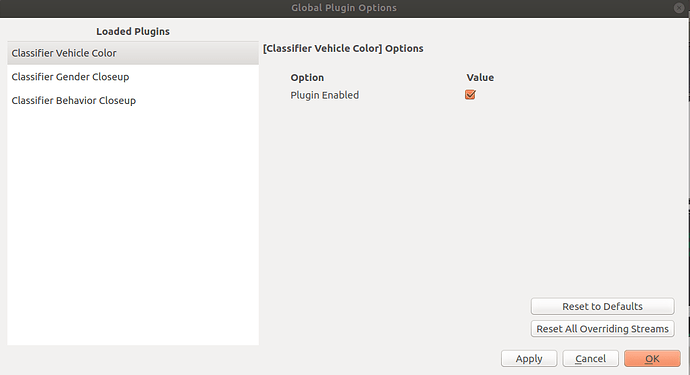
But when I set the alarm, there is no dropdown option for the condition variable, and the OK button is also gray, so I cannot complete the alarm configuration
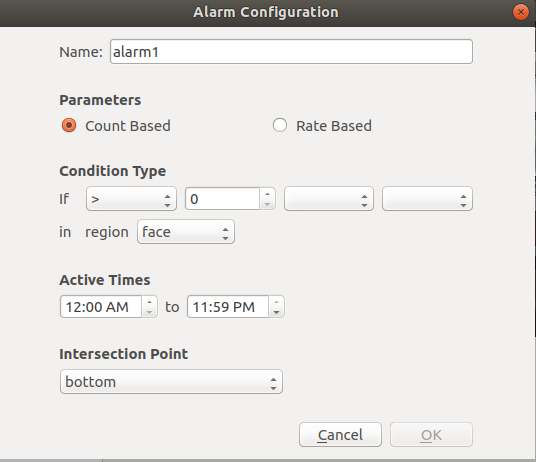
Oh, my mistake, this is a different problem than I originally though.
Each Capsule is capable of receiving input from other capsules. If you go to our the capsules section on our Downloads page page you can see the Required Input for each Capsule.
For example, here are the required inputs for the capsules you currently have loaded:
This capsule requires any of the following detections: Vehicle, Bus, Car, Motorcycle, or Truck. It doesn’t need all of them, but at least one of them.

This capsule requires a detection of type “Person”

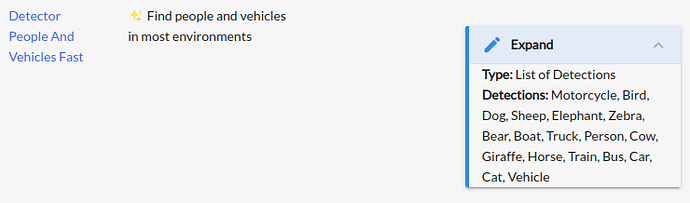
Both of these (vehicles, persons) can be detected by our Detector People And Vehicles Fast. Simple download this plugin, and the “Classifier Behavior Closeup” and “Classifier Vehicle Color” will work!
This requires a detection of type “Face”

This can be detected by several of our capsules. I recomend the Detector Face Openvino which runs quickly without a GPU, or Detector Face Fast which runs quickly with a GPU.

Thank you very much for your help. It’s ready to run now!