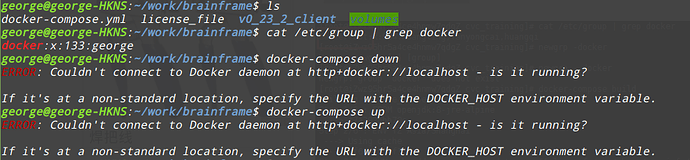
Could you help me to solve this problems? Thanks.
Archived from the BrainFrame forum. Posted Mar 10, 2020. 6 replies · 2,561 views
Hi george, this sounds like a docker issue. Have you been able to run this command in the past?
Try running the command with sudo. If that works, then follow these instructions for adding using Docker as a non-root user.
Hello Alex, thanks for your time. I have removed grafana-piechart-panel,another error:
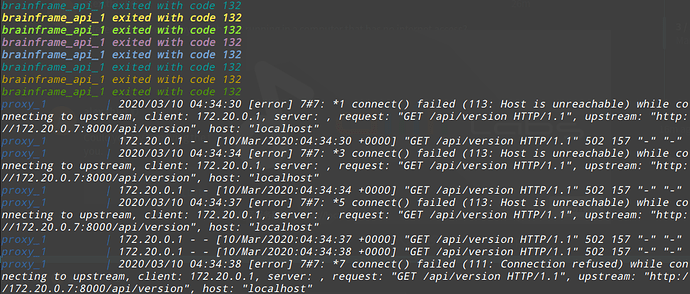
Interesting… Are you by any chance running in a computer that has no internet access?
Could you try removing the following lines from your docker-compose.yml and trying again? Thank you.
    environment:
      GF_INSTALL_PLUGINS: "grafana-piechart-panel"
Hello Alex, thanks for your time. I have removed grafana-piechart-panel,another error:
The brainframe_api seems to be failing constantly… Could you try deleting your volumes/ directory then trying again? (This will delete any database configuration, so if you need that just rename it)
After doing that if there’s still an error, could you upload the output of
docker-compose logs > logs.txt so that I can further debug the error?